A website firewall review should begin with the threats that can interrupt your business, not a checklist of impressive-sounding features. A firewall that blocks common attacks but slows checkout pages, creates false positives, or leaves your team to interpret alerts alone is not delivering the protection your website needs. The right service should reduce risk without creating a daily management burden.
For a small business site, WordPress blog, online store, or agency-managed client portfolio, a web application firewall is one layer in a broader security plan. It can filter harmful traffic before it reaches your hosting environment, but its value depends on how accurately it identifies threats, how well it fits your site, and what support is available when something needs attention.
What a Website Firewall Should Protect Against
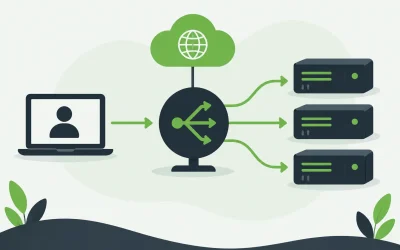
A website firewall, often called a web application firewall or WAF, examines requests sent to your site and applies rules designed to stop malicious activity. It sits between visitors and your website, helping keep suspicious requests from reaching your applications, database, and server resources.
The baseline expectation is protection against known attack patterns. That includes attempts to exploit vulnerable plugins or themes, SQL injection attacks aimed at databases, cross-site scripting attempts, malicious bots, brute-force login activity, and traffic patterns associated with denial-of-service attacks. For an eCommerce store, bot protection can be especially valuable when automated traffic targets login pages, inventory, pricing, or checkout functions.
A useful firewall does more than apply a fixed set of generic rules. Attack methods change quickly, and new software vulnerabilities can become a problem before a site owner has time to patch every affected component. Look for regularly updated threat intelligence and rules that can address newly identified risks. This matters most for websites using popular content management systems, third-party extensions, and custom integrations.
That said, a firewall is not a replacement for updates, secure passwords, malware scanning, backups, or access controls. Think of it as a capable gatekeeper, not the entire security team. An unpatched plugin can still be a liability, even when a firewall reduces the chance of someone exploiting it.
Website Firewall Review Criteria That Affect Results
Security claims can look similar across providers. The differences become clearer when you review how the service performs in real operating conditions.
Detection quality and false positives
Blocking harmful traffic is the central job, but blocking legitimate customers is a costly mistake. A firewall may flag a valid form submission, payment request, API call, or administrator login as suspicious. If you operate a membership site, booking platform, or store with custom functionality, this risk deserves close attention.
Ask whether the firewall supports rule tuning, allowlists, IP blocking, rate limiting, and temporary exceptions. More importantly, consider who will handle those adjustments. A developer may be comfortable reviewing logs and changing rules. A business owner with limited technical time may need managed assistance and clear support options.
The best setup balances protection with context. A site that accepts file uploads, uses a custom checkout, or connects to outside services may require rules that differ from a simple brochure website.
Performance and traffic handling
Security should not come at the expense of a slow website. Depending on how the firewall is deployed, it may inspect traffic before it reaches your server or operate closer to the application itself. Edge-based filtering can help absorb malicious traffic earlier, while application-level controls can provide more direct visibility into site-specific activity.
Either approach can be appropriate. What matters is whether the service is designed to handle your typical traffic volume and traffic spikes without adding noticeable delays. Review available performance data carefully, but also consider the architecture of your hosting plan. A firewall cannot compensate for an underpowered server, inefficient database queries, or oversized images.
For high-traffic campaigns and online stores, ask how the provider handles bot surges and denial-of-service events. Rate limiting and challenge mechanisms can help, but overly aggressive challenges may frustrate real visitors. The setting should match the stakes of your site and the patterns of your audience.
Setup, compatibility, and ownership
Some firewalls are easy to activate but offer limited control. Others provide more granular policies but require DNS changes, plugin installation, server configuration, or developer involvement. Neither model is automatically better.
For a first website or small business site, a managed firewall that is straightforward to configure may be the practical choice. Agencies and developers managing multiple client sites may prioritize centralized controls, reporting, custom rules, and the ability to separate policies by application.
Before purchasing, confirm compatibility with your platform. WordPress, WooCommerce, custom PHP applications, Windows hosting environments, Linux servers, APIs, and content delivery systems can have different requirements. Also clarify where configuration responsibility sits. If an update or site change causes a firewall conflict, you need to know whether your hosting provider, security vendor, or development team will investigate it.
Monitoring, alerts, and support
Security alerts only help when they are understandable and actionable. A dashboard filled with unexplained blocked requests may create more noise than value. Look for reporting that shows what was blocked, why it was blocked, what URL or service was targeted, and whether any action is required from you.
Support is a major differentiator here. When a customer says a form is not working or a developer reports an API error, response time matters. A service with capable technical support can help determine whether the issue is firewall-related, application-related, or caused by the hosting environment.
For many businesses, integrated support is easier than coordinating several vendors. Charter Hosting customers can evaluate website security alongside hosting, SSL certificates, backups, and server resources, which can simplify troubleshooting when performance and protection overlap.
Questions to Ask Before You Choose
The best firewall depends on your website’s role in your business. A personal blog with low traffic has different needs from an online store that processes orders all day or an agency hosting several client sites.
Start by identifying what would cause the most damage. Is it malware infecting the site, downtime during a promotion, stolen administrator credentials, fake account registrations, or a vulnerable plugin? Then consider your available resources. A technically experienced team may benefit from detailed rule controls. A lean business may be better served by a managed option that provides useful protection without constant oversight.
It also helps to ask whether the service includes these practical capabilities:
- Protection against common web exploits and automated bot activity
- Rules updated in response to emerging vulnerabilities
- Controls for blocking, allowing, and rate-limiting specific traffic
- Clear alerts and activity reporting
- Support that can assist when legitimate traffic is affected
Price should be evaluated in context. A low monthly rate is less valuable if the service requires frequent manual work or does not support the applications your business relies on. On the other hand, a feature-heavy enterprise firewall may be unnecessary for a straightforward site with limited traffic and a well-maintained platform.
Do Not Treat a Firewall as a One-Time Purchase
A firewall performs best when it is part of routine website maintenance. Keep your CMS core, themes, plugins, and applications current. Remove extensions you no longer use. Require unique passwords and multi-factor authentication where available. Maintain tested backups so you have a recovery path if an incident reaches beyond the firewall.
Review firewall activity after major site changes, software updates, and traffic campaigns. If you launch a new checkout process, add a customer portal, or connect an external tool, verify that legitimate requests are still working as expected. A small amount of preventative testing is far easier than diagnosing lost sales or blocked leads after the fact.
The right firewall should make your site harder to attack without making it harder to run. Choose one that fits your platform, traffic, technical resources, and support expectations, then keep it aligned with the way your business grows.